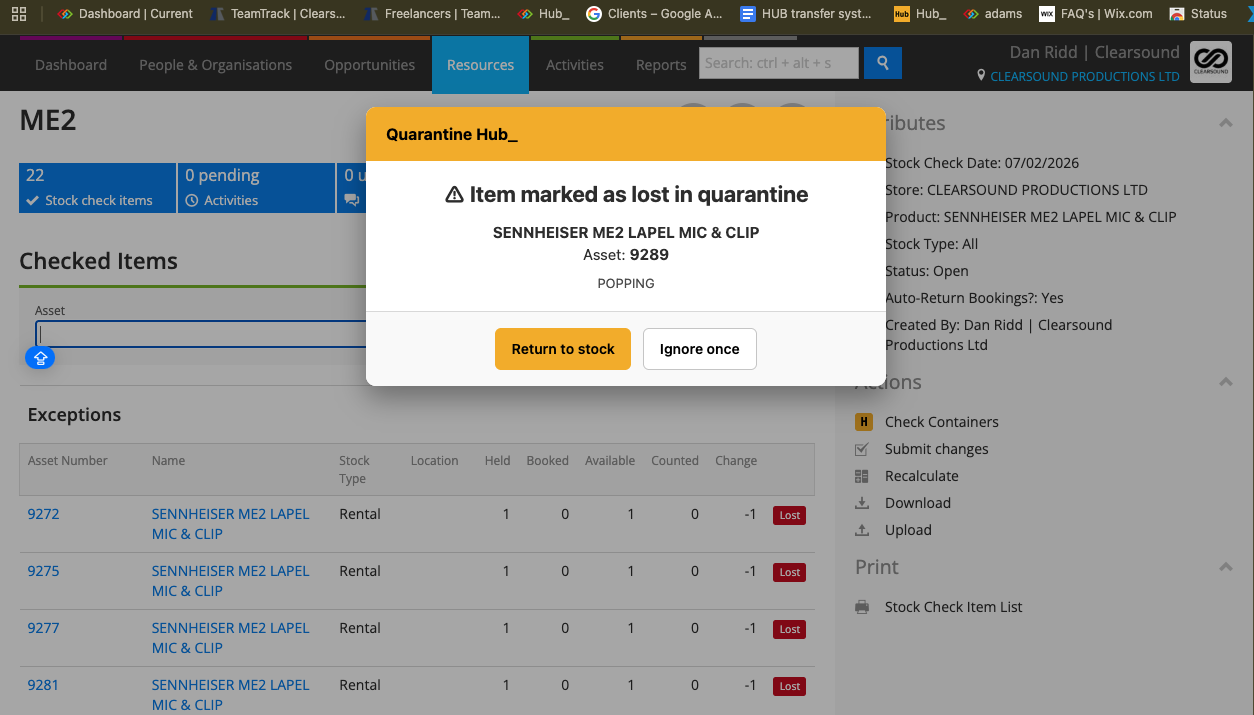
Quarantine Hub_
Review quarantined equipment when it is scanned, with separate controls for stock checks and Opportunity allocation workflows.
Quarantine Hub warns when a lost asset is found during a stock check. On supported Opportunity scan forms, Scan Check also protects Allocate, Prepare and Book out using the active quarantine list.
What It Does
Stock-check scans of assets marked Lost in quarantine display the asset, product and available source-job information
Return to stock completes the Lost quarantine and allows the found asset to return to use
Ignore once continues that stock-check scan without completing the quarantine
Scan Check blocks quarantined assets in supported Allocate, Prepare and Book out workflows
Shows quarantine records and list status, with Refresh List and a link to the relevant Current quarantine
An explicit Override opens a second review before Override and Continue permits that scan; it does not complete the quarantine
Uses cached data while refreshing and shows when the required list is unavailable
The same Scan Check panel also provides Container Check, which validates container contents and job quantities during Allocate
How To Use It
During a Stock Check, scan normally. If a Lost-quarantine warning appears, verify the physical asset and its record.
Choose Return to stock only when the Lost quarantine should be completed. Choose Ignore once when continuing the scan without changing quarantine status is appropriate.
On an Opportunity, open Scan Check and review whether protection is enabled and the quarantine data is ready. Use Refresh List when required.
When Allocate, Prepare or Book out is blocked, open the quarantine record and resolve the reason before continuing.
If an intentional exception is required, use Override, review the asset and confirmation, and select Override and Continue for that scan.
Review the separate Container Check controls when allocating a container. Check its contents and the job’s required quantities if the scan is blocked.
💡 Why it’s useful:
The warning appears where the asset is being handled, making quarantine status harder to miss. Clear separation between a one-scan override and actually returning an item to stock helps preserve the intended quarantine record.