Credit Control Hub_
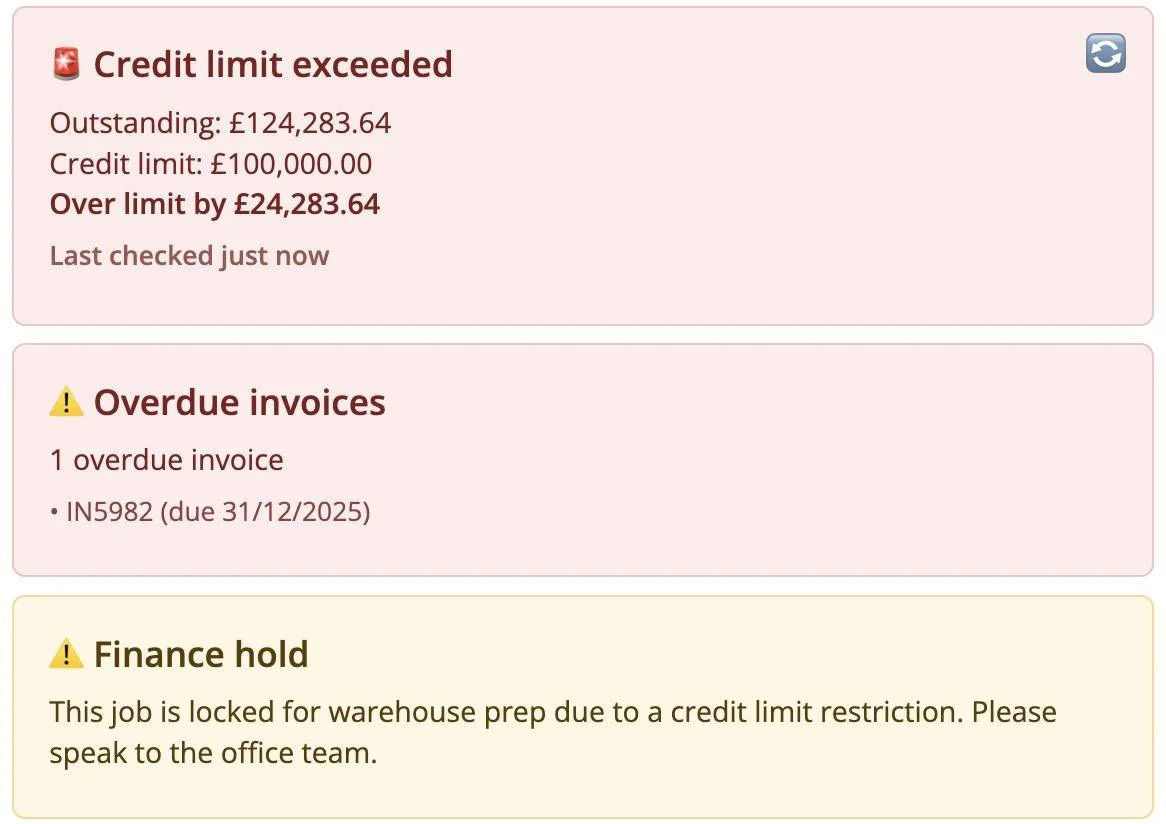
Credit Control Hub helps you stay on top of customer credit risk directly from the Opportunity page. It pulls live financial data from Xero and shows clear, visual warnings when a client has overdue invoices, is approaching their credit limit, or has exceeded it — helping you avoid unwanted risk before work goes ahead.
How it works
Credit Control Hub pulls live invoice data from Xero.
It calculates:
The customer’s current outstanding balance
Any overdue invoices
This is compared against the Credit Limit stored in Current RMS.
Visual status banners are shown on the Opportunity:
Clear warnings when invoices are overdue
Alerts when the job value would push the account over its credit limit
If the credit limit is already exceeded and Credit Limit Hold is enabled, the Opportunity is locked from progressing.
A Refresh button lets you re-check balances and overdue invoices instantly without reloading the page.
To use it
Open an Opportunity in Current RMS.
Enable Credit Control Hub in Hub Settings.
Ensure the customer has:
Credit Limit set
Credit Limit Hold configured (if required)
Use Refresh to pull the latest invoice and overdue status from Xero at any time.
💡 Why it’s useful
Credit Control Hub removes guesswork and last-minute surprises by making overdue invoices and credit risk visible at the point of action. It helps sales, warehouse, and production teams stay aligned with finance rules — reducing risk, avoiding awkward conversations, and keeping control where it matters most