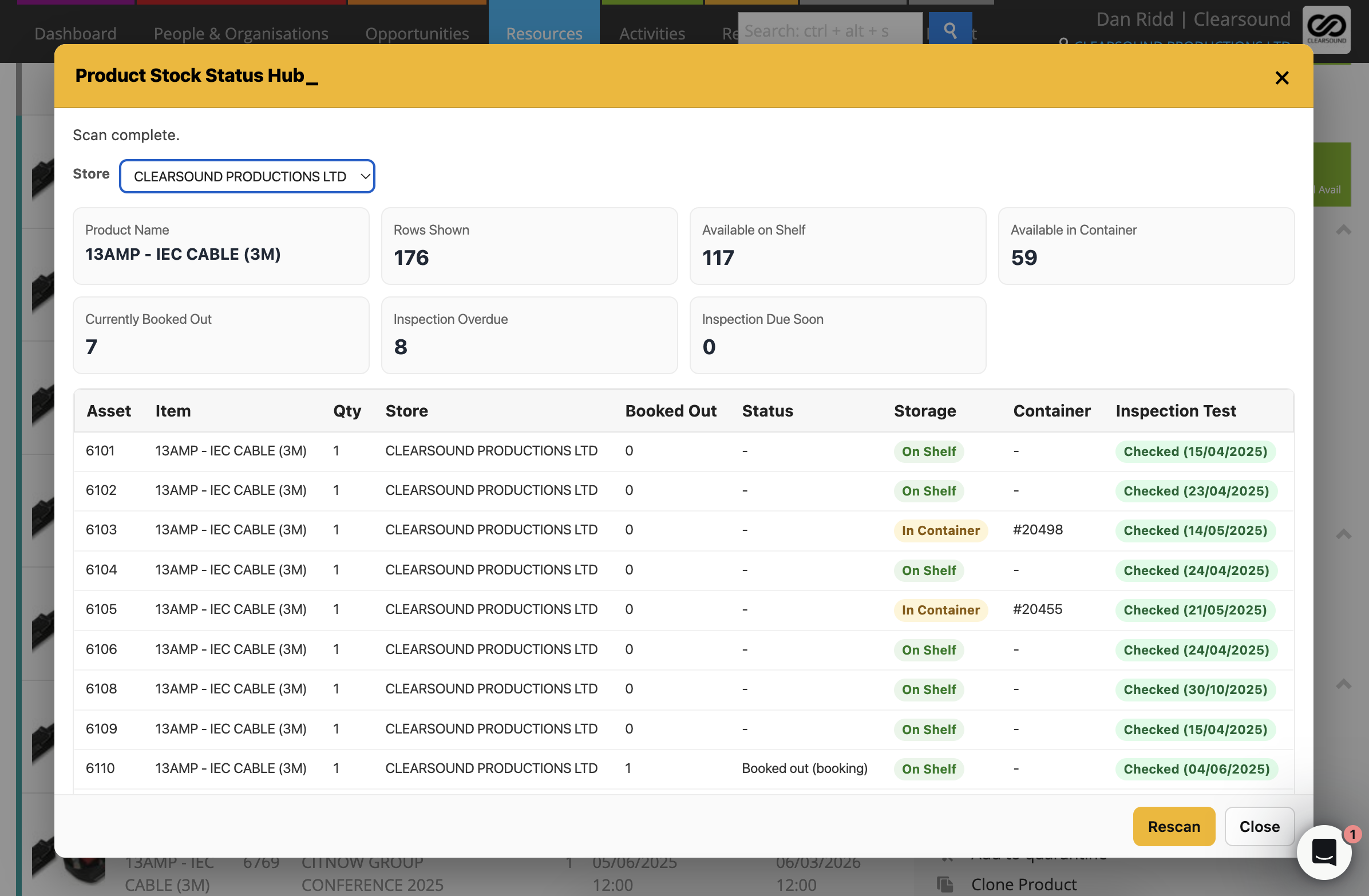
Product Stock Status Hub_
Product Stock Status Hub gives you a clear, real-time view of where your stock actually is.
In busy warehouses it’s common to think something is missing from the shelf, only to later discover it’s packed inside a container or already booked out. This tool brings all that information together so you can instantly understand the real stock situation.
How it works
• Shows how many items should be available on the shelf.
• Displays items currently packed inside containers.
• Highlights items that are booked out on jobs.
• Shows the inspection status of the product.
• Allows you to select the store to view stock for a specific location.
To use it
• Open a Product in Current RMS.
• Go to the Actions tab.
• Click Product Stock Status Hub_.
• Allows you to select the store to view stock for a specific location.
• Review the live stock breakdown for that product.
💡 Why it’s useful:
Instead of jumping between containers, bookings, and inspection screens, Product Stock Status Hub_ gives you a quick, accurate picture of where your stock really is — helping warehouse teams track items faster and avoid unnecessary searching.