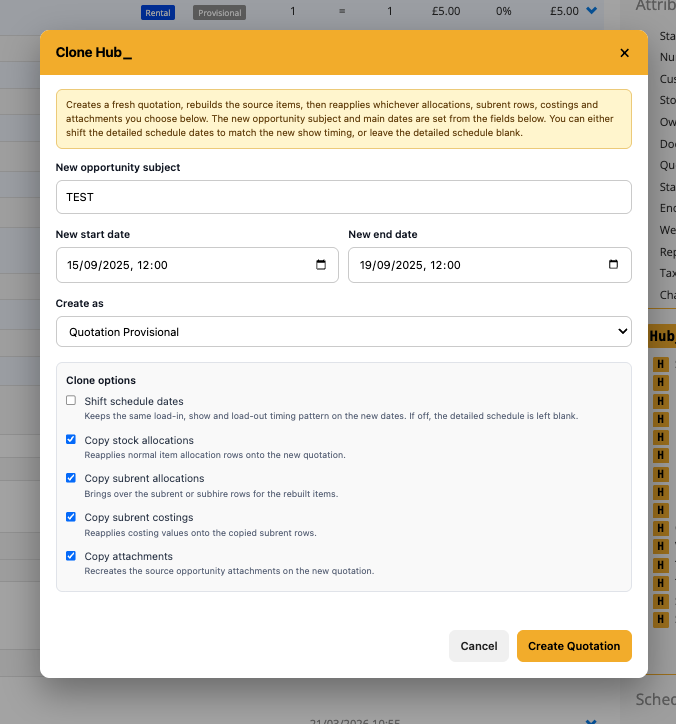
Clone Hub_
Clone Hub_ lets you create a brand new Opportunity from an existing one, so you can reuse a full job build without manually rebuilding items, allocations, costings, notes, and attachments from scratch.
It’s designed for repeat shows, repeat hires, revised quotes, and fast-turnaround jobs where the structure stays mostly the same, but the subject, dates, schedule, or final job state need to change.
How it works
• Opens from the Hub menu inside an Opportunity.
• Creates a new Opportunity based on the current one.
• Lets you enter a new subject, start date, and end date before creating it.
• Lets you choose whether to create it as a Provisional Quotation, Reserved Quotation, or Order.
• Rebuilds the full item structure onto the new Opportunity.
• Keeps item order, grouping, nesting, quantities, pricing, discounts, descriptions, chargeable days, warehouse notes, and other supported item details.
• Optional checkboxes let you choose whether to copy stock allocations, subrent allocations, subrent costings, and attachments.
• Includes a schedule option so you can either shift the detailed schedule dates to the new calendar dates while keeping the same load-in, show, and load-out pattern, or leave the detailed schedule blank.
• Recreates the new Opportunity as closely as possible while still letting you change the key job details at the point of cloning.
To use it
• Open an Opportunity.
• Open Clone Hub_ from the Hub menu.
• Enter the new Opportunity subject.
• Set the new start and end dates.
• Choose whether the new job should be a Provisional Quotation, Reserved Quotation, or Order.
• Choose which options you want to carry over, including allocations, subrent, costings, attachments, service dates, and schedule handling.
• Click Create to build the new Opportunity.
• Open the new Opportunity and make any final changes if needed.
Why it’s useful
Clone Hub_ saves time when a job needs to be repeated or adapted. Instead of rebuilding the whole Opportunity manually, you can create a fresh one with the same structure, keep the important setup details, and decide exactly which scheduling and costing data should come across.